Kaggle Overnight

Available now

Keep up with the best notebooks. Then push further while you sleep.

Autoresearch for Kaggle: an open-source AI agent for Kaggle competitions. It watches the competition's public notebooks every hour and brings the best of them into your own rounds, so your leaderboard score keeps pace with the field. Then auto-run keeps experimenting on top of them overnight, looking for the edge — and the morning report, with every failed idea on record, reaches your phone.

$ pip install researchforge

Keep up, then push further

Not just improving: keeping your score current.

On a live competition the public leaderboard moves every day. Kaggle Overnight does two jobs, all night: it keeps your entry level with the best public work, and it runs its own improvement loops on top, looking for an edge.

1 · Keep up

The best public notebooks, brought into your rounds

  • Every public notebook is checked each hour, re-runs included, and ranked by the score its author claims.
  • Those claiming more than your best score go to the top of the idea pool and run as rounds on your compute — adopted whole or merged with what you already have.
  • A round that leaves a better submission is offered to you; one click on Approve & submit updates your leaderboard entry. It never submits on its own.

Enveda CASMI 2026: adopting a top public notebook's pipeline as a round took the public score from 0.213 to 0.479 — rank 3,856 (5 Nov) → 1,421 of 5,305 (15 Nov). Squares in Squares: merging the watcher's newest notebooks took it from 22.1756 to 22.1580 locally in one day (lower wins).

2 · Push further

Improvement loops on top, with no chat open

  • Auto-run keeps launching rounds overnight with Claude Code, Cursor or your own key.
  • Ideas come from your directions, arXiv, the gap to the notebooks ahead of you and the loop's own results, re-synthesized every five rounds.
  • Each round is kept only if it beats every earlier one; failures stay on record so they are never retried.

Honestly, so far: keeping up has given the bigger gains. Our own rounds took Enveda from 0.166 to 0.213 before the public pipeline, and added almost nothing on Squares. Every attempt is on record either way.

localhost:7842
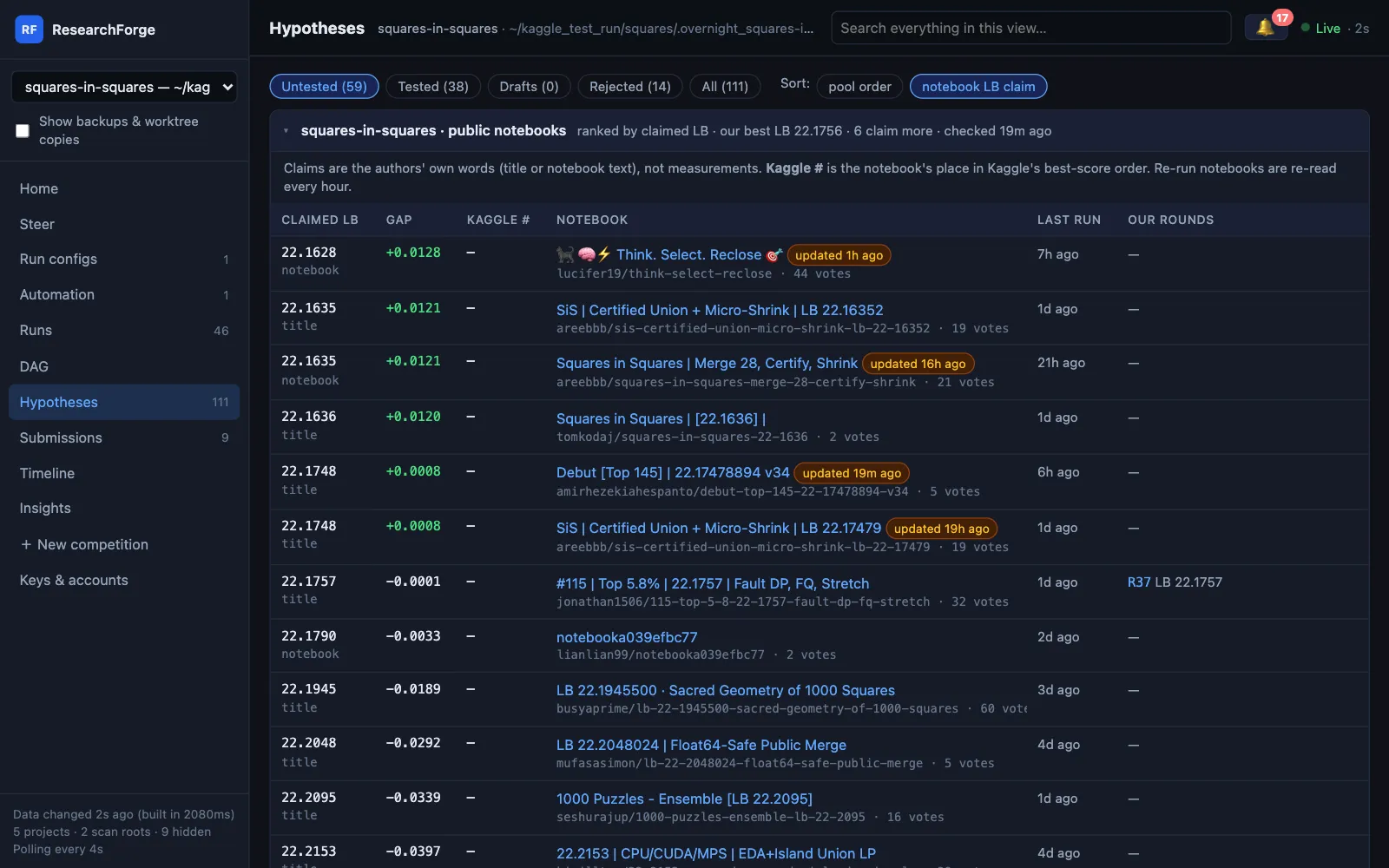
Public notebooks ranked by claimed score, with the gap to our best and the rounds that ran them
The notebook board: every public notebook ranked by the score it claims, the gap to yours, and which of your rounds ran it

Get started

Install once. Drive it from where you already work.

Every path starts with the same pip install. Pick your editor, or none at all.

Claude Code

  1. 1
    $ pip install researchforge
  2. 2
    $ researchforge claude install --user

    or install the Claude Code plugin (below)

  3. 3
    › /overnight <competition-url>

    from the plugin: /researchforge:overnight

Cursor

  1. 1
    $ pip install researchforge
  2. 2
    $ researchforge cursor install --user
  3. 3
    › @overnight <competition-url>

    in the agent chat

No editor

  1. 1
    $ pip install researchforge
  2. 2
    $ export RESEARCHFORGE_LLM=ollama/qwen3:14b

    a local model, or ANTHROPIC_API_KEY / GEMINI_API_KEY / OPENAI_API_KEY

  3. 3
    $ researchforge kaggle overnight <competition-url>
  4. 4
    $ researchforge kaggle run <slug>

Claude Code plugin

The same skills from the plugin marketplace, as /researchforge:overnight. Still needs the pip install; use the plugin or claude install, not both.

› /plugin marketplace add forger-labs-hq/researchforge› /plugin install researchforge@researchforge

A real night

Squares in Squares, 13–14 November.

Every line is from the project record, nothing rearranged. Auto-run launched 40 of this competition's 46 rounds on its own, and none of them submitted anything.

  1. 00:30

    Auto-run starts a launch with Claude Code — no chat open. The hourly notebook check has found six public notebooks claiming a better score than ours.

  2. 00:53

    R41 merges their packings per n: 22.1756 → 22.1633. Kept. A submission question goes to the phone and the 🔔.

  3. 01:18

    R42 adds notebooks the earlier rounds never downloaded: 22.1630. The launch stops at its two-round limit.

  4. 06:30

    Next launch. R43 refreshes the notebooks that moved overnight: 22.1617.

  5. 07:03

    R44 polishes the new packings: 22.16174. The launch stops at two rounds again.

  6. Morning

    Four submission questions wait in the 🔔. Nothing was submitted while you slept — that is your Approve & submit.

Under the hood

Nine things it does so you don't have to.

01

Picks the right GPU for you

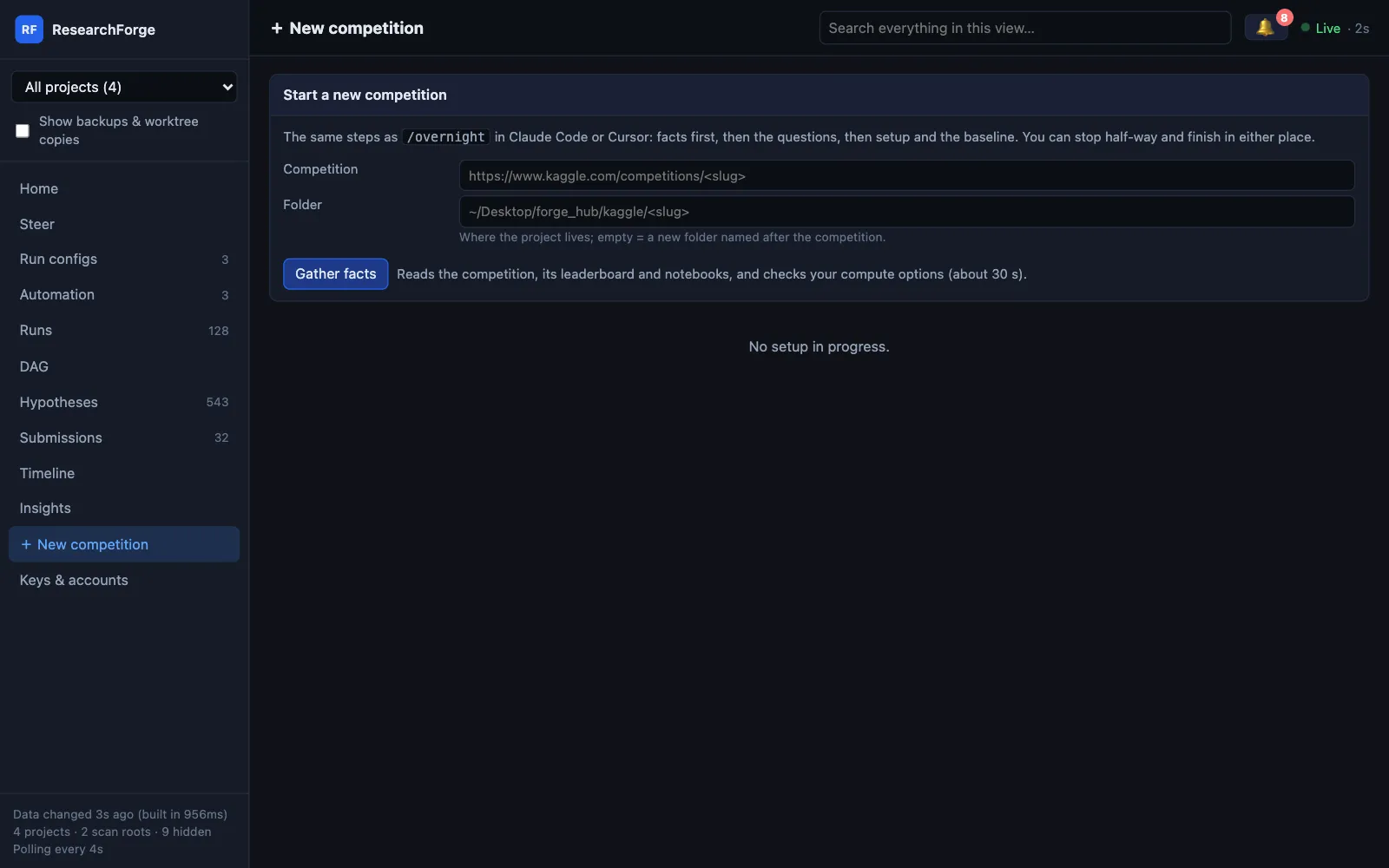
Before it asks you anything, it gathers the facts: data size, whether it is a code competition, the top public kernel and its score, your free disk, your Kaggle GPU quota, and the GPU on this machine (CUDA, Apple MPS or CPU). Then it recommends one target and says why — in the chat, or as a form on the dashboard’s New competition page.

localhost:7842
Or start from the dashboard: + New competition
$ researchforge kaggle gather-facts <slug>

Prints the facts and the recommended compute (with its reason) as JSON for Claude.

02

Runs where your data is allowed to be

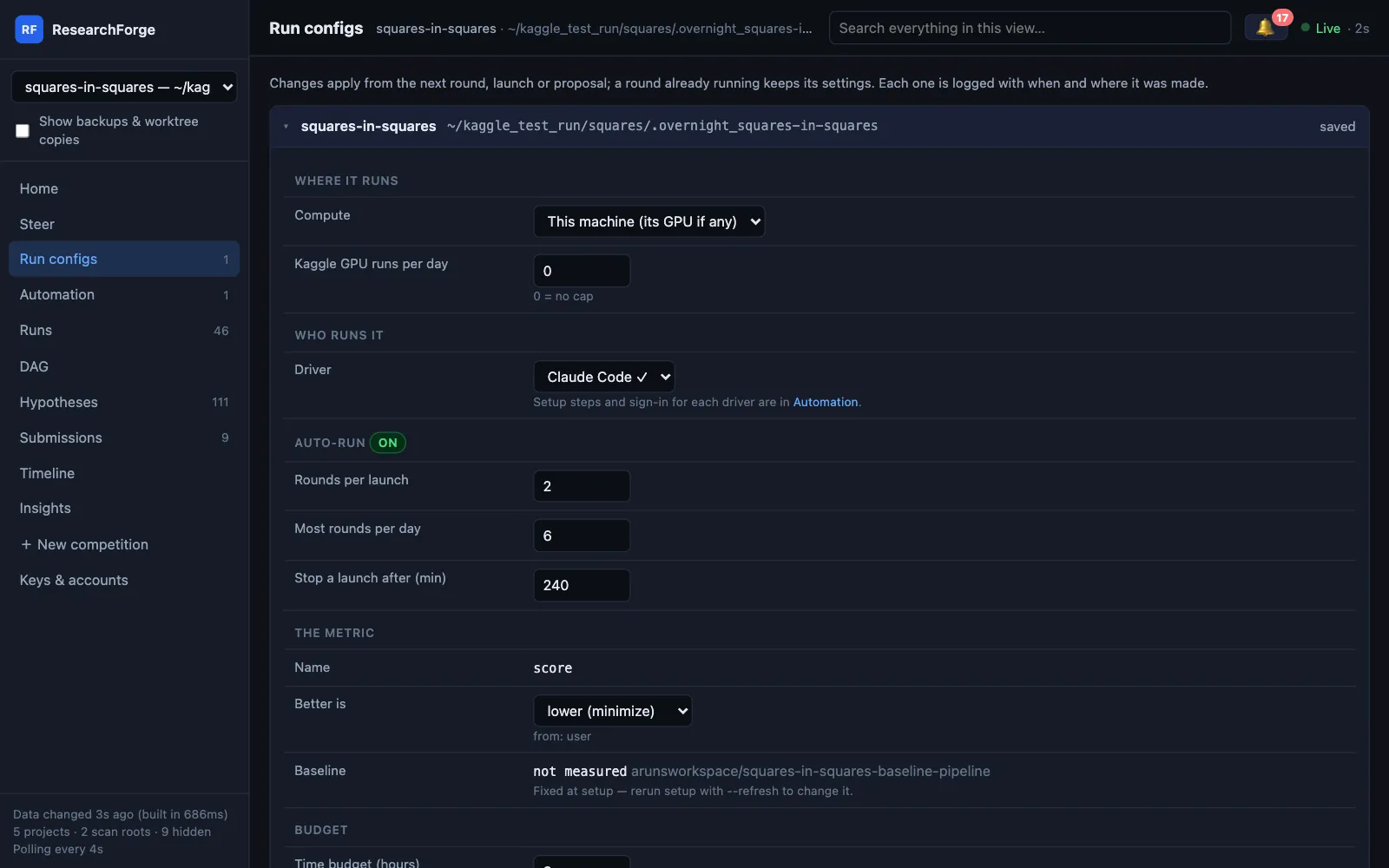
Each experiment is routed to a compute target: Kaggle GPU (internet on or off), a competition-provided GPU, this machine, Google Colab, your own SSH server, or a pay-per-hour RunPod or Lambda GPU that is provisioned, used and terminated per round (SSH and cloud GPUs are implemented and tested, not yet used on a real competition). Colab runs through Google’s Colab CLI with no Run all click: each round rents a fresh VM with the GPU your plan allows (T4, L4, G4, A100 or H100), runs in the background and survives a dropped connection, brings its submission file back and releases the VM. Every round has a time limit you set (30 minutes by default), and Kaggle GPU can be capped per day. A compute policy refuses any target that would download data it must not.

localhost:7842
Run configs: where it runs, who runs it, auto-run limits and the metric — editable while it runs
$ researchforge kaggle colab-setup <slug> --plan pro --gpu L4$ researchforge kaggle ssh-setup <slug>$ researchforge kaggle cloud-gpu-setup <slug> --provider runpod|lambda
03

Works while you sleep

Schedule it: check new public notebooks every 4, 6, 12 or 24 hours; start experiments now, at a time, or manually; send the morning briefing on completion, at a time, or both — optionally only if something improved.

$ researchforge kaggle scheduler-setup <slug> --watcher-hours 6 --start-at 23:00 --briefing-at 07:00
04

Keeps running with your editor closed

Install the monitor as a background service — launchd on macOS, a systemd user timer on Linux, Task Scheduler on Windows — and it survives Claude Code being closed and restarts at login. It checks the real clock every minute, so a cycle missed while the Mac slept runs within a minute of waking, and a round whose process died is recorded as interrupted instead of blocking the next one.

$ researchforge kaggle scheduler-install <slug> --interval-hours 6$ researchforge kaggle scheduler-uninstall <slug>
05

Runs new ideas with no chat open

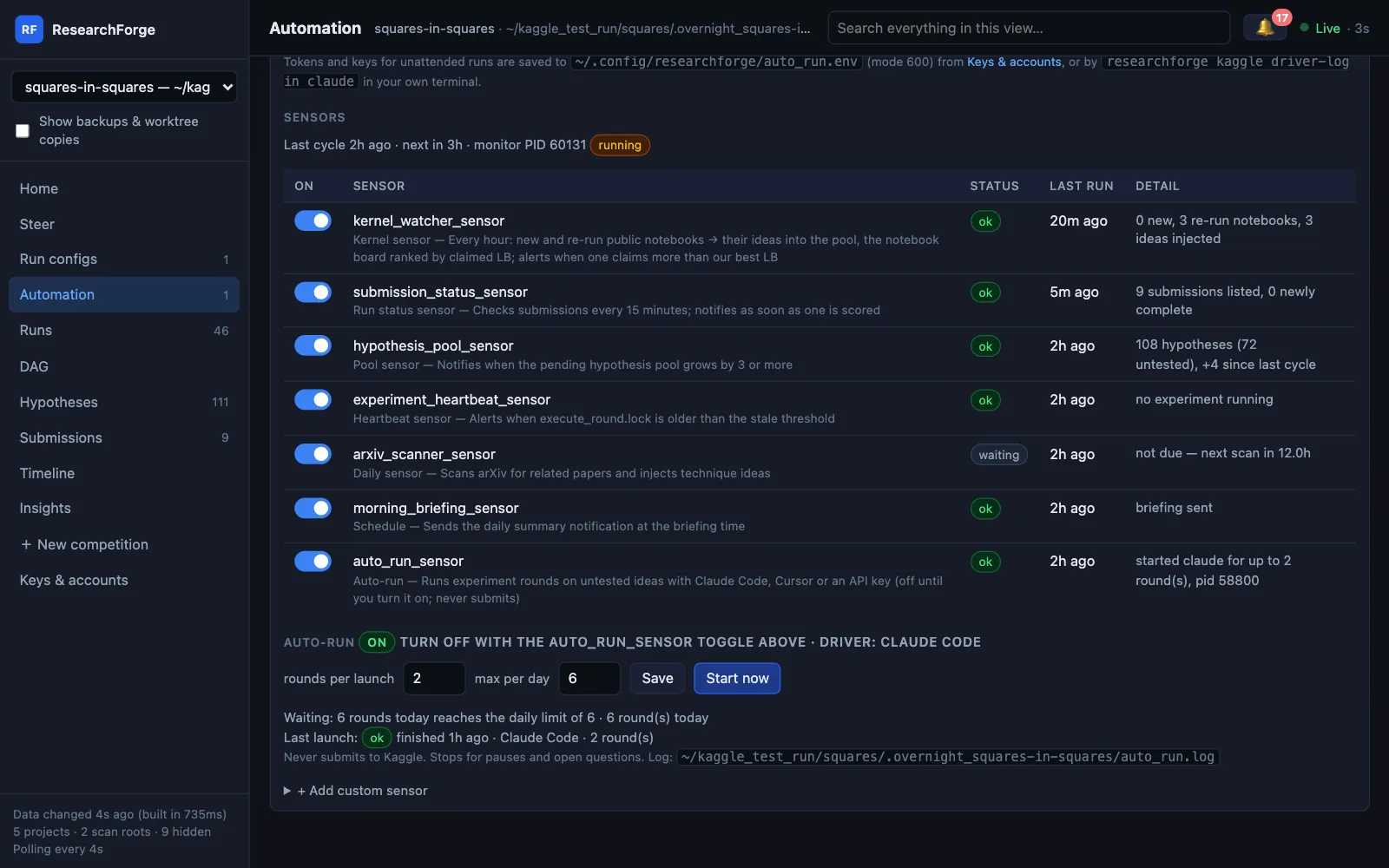
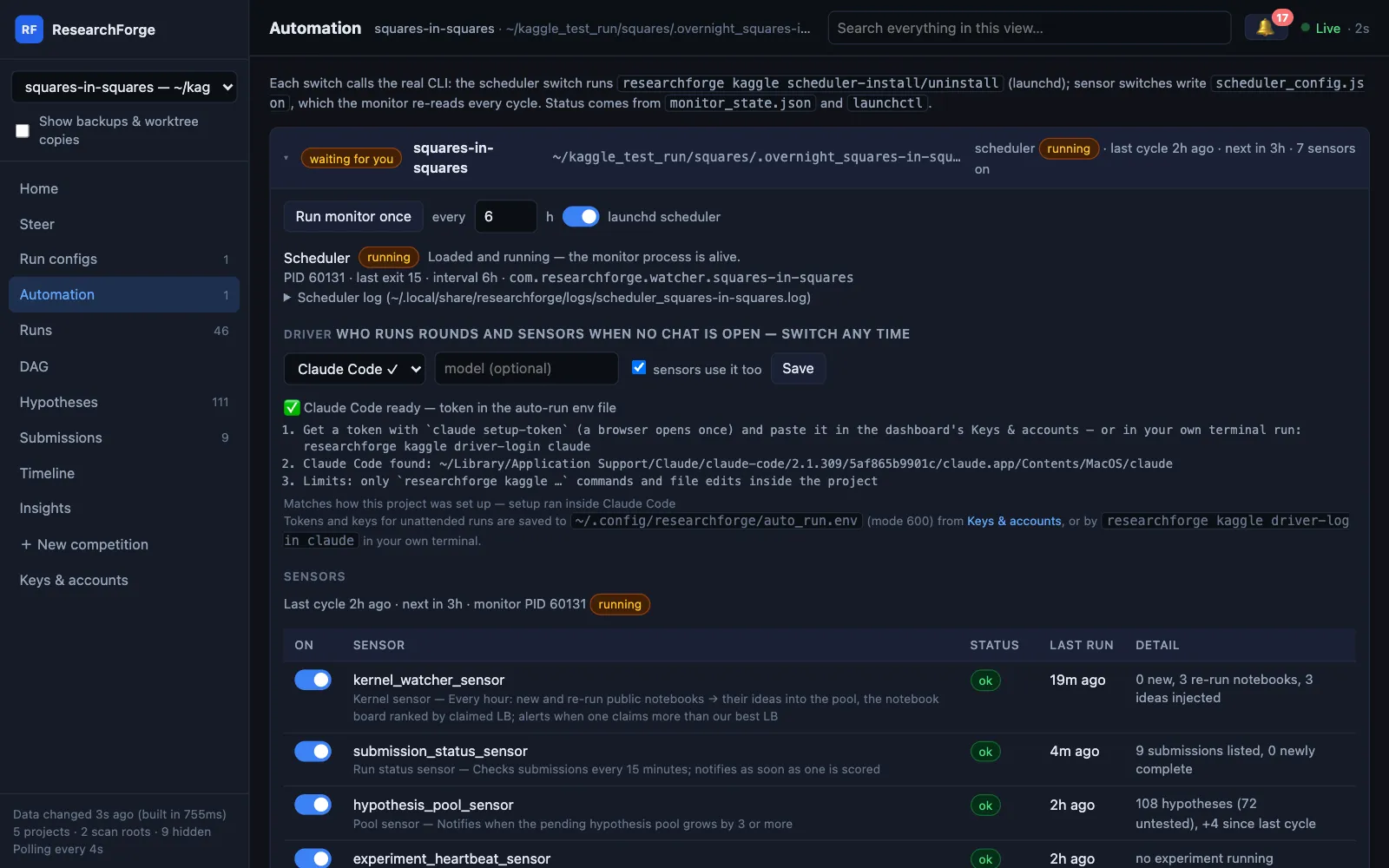
Auto-run is an opt-in sensor: each monitor cycle, if the idea pool has untested ideas, it starts rounds with the driver you pick — headless Claude Code, the Cursor agent, or your API key. It waits while the loop is paused, a question is holding it, a round is running, or the daily limit or Kaggle GPU cap is reached, and waits out a driver’s usage limit instead of failing. Steer it with directions from the dashboard or a terminal. It never submits.

localhost:7842
Squares in Squares: every sensor’s last result, and auto-run on with Claude Code as the driver
$ researchforge kaggle auto-run <slug> --on$ researchforge kaggle steer <slug> "try a transformer next" --standing

Tokens and keys are pasted on the dashboard’s Keys & accounts page or typed in your own terminal — never in the chat.

06

Sensors watch the competition

New public kernels become ideas (and alert you if one beats your baseline); your submissions are tracked until they score; the idea pool, hung experiments, a daily arXiv scan and the morning briefing each have a sensor. The project’s driver does their AI work, so they need no API key. Add your own: any shell command, where exit 0 means healthy.

localhost:7842
The background scheduler and the driver for Squares in Squares
$ researchforge kaggle sensors <slug> --disable arxiv_scanner_sensor$ researchforge kaggle sensors <slug> --add disk --command "df -h ."
07

Ideas from five sources

arXiv papers, the titles of top public kernels, what you tell it at setup, ideas the watcher finds overnight, and re-synthesis from your own results every five rounds. Public notebooks are checked every hour; those claiming more than your best leaderboard score rank first — labelled as claims, never as measurements. To run a notebook as a round, pull it explicitly.

localhost:7842
Public notebooks ranked by the score they claim, with the gap to our best and the rounds that ran them
$ researchforge kaggle add-hypothesis <slug> "try focal loss"$ researchforge kaggle propose-from-kernel <slug> <owner/notebook> --title "…"
08

Branches, merges, and remembers failures

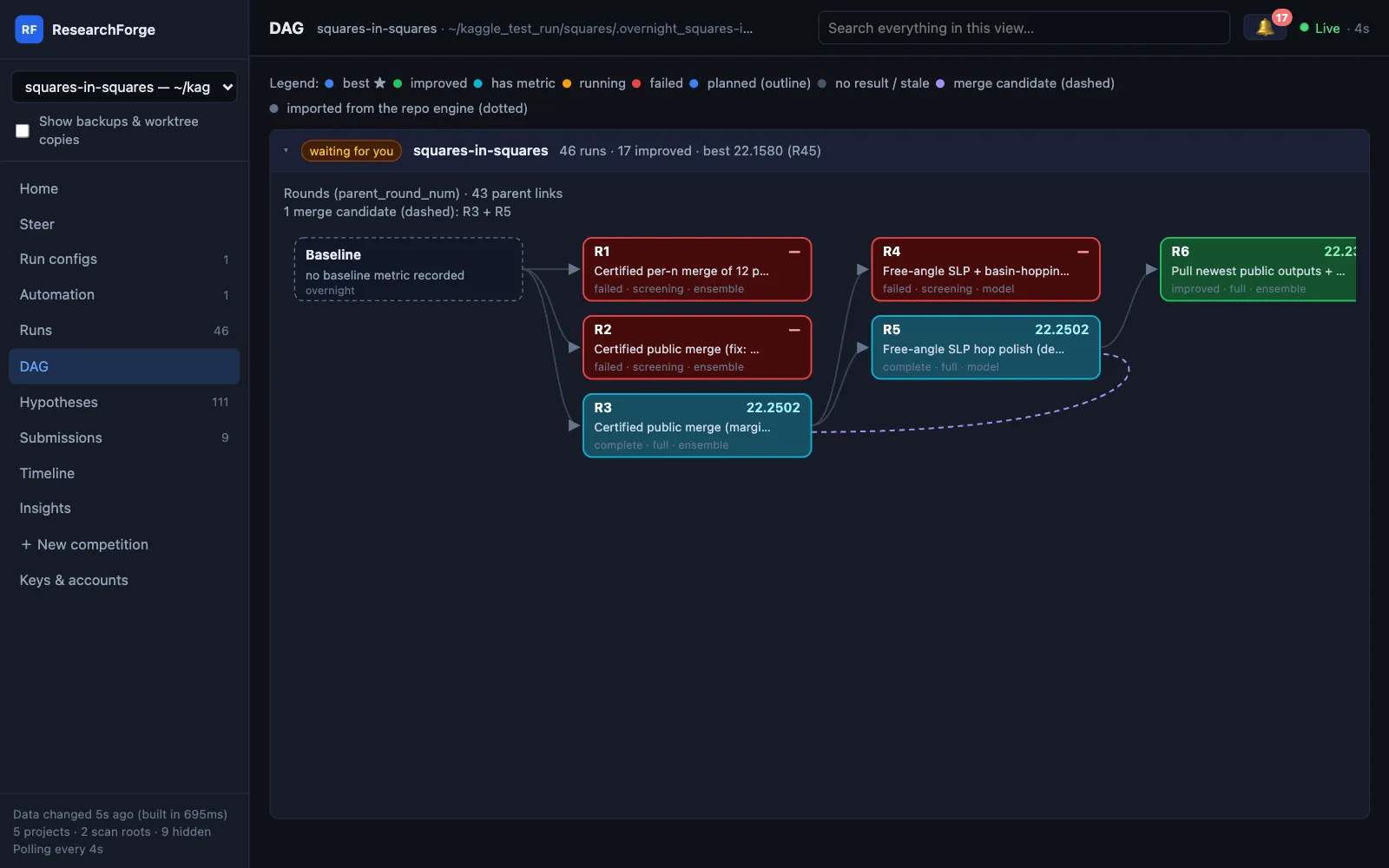
Every experiment is a node: winners become parents, two independent wins are merged to test whether the gains add up, and failed approaches stay on record with the reason so they are not retried. One history per competition: the Kaggle loop is its only engine, and a repository project beside it is folded in as imported, never-best nodes. With no baseline, a round must beat the best earlier round to count as improved. Archive a round to take it out of every view — reversibly.

localhost:7842
Squares in Squares: failures in red, improvements in green, a merge candidate dashed
$ researchforge kaggle prepare-round <slug>$ researchforge kaggle run-parallel <slug>
09

Asks you on your phone. Never submits for you.

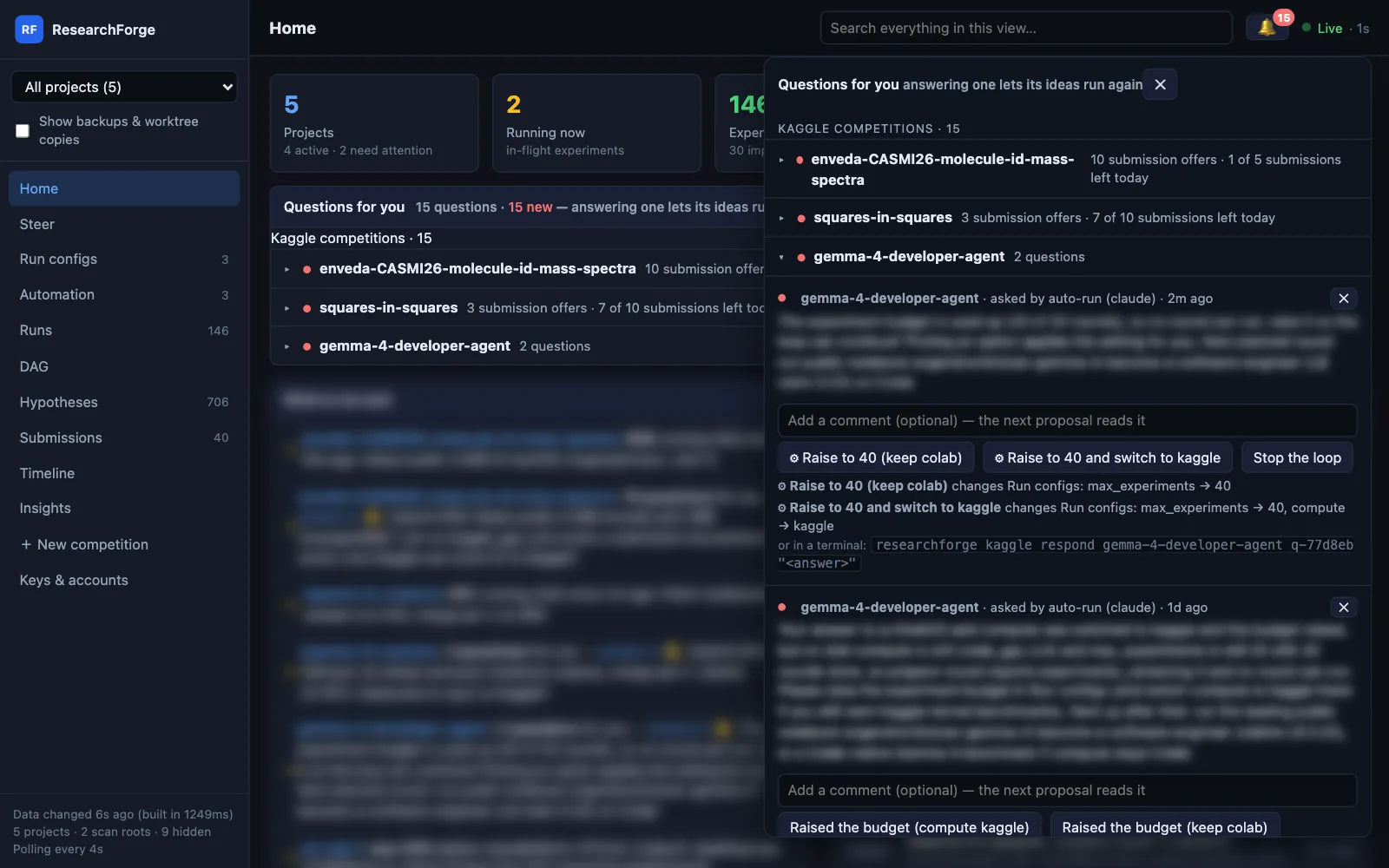
Push notifications through ntfy (free, no account) or Telegram — at the level you pick, from every result to submission candidates only. When a run needs a decision it asks instead of stopping: the question reaches your phone and the dashboard’s 🔔, and only the ideas it names wait. Every improved round you could submit gets Approve & submit — checked against Kaggle’s daily limit, never sent twice. ResearchForge never submits on its own.

localhost:7842
The 🔔: each competition shows its submissions left today, checked before any approval
$ researchforge notify setup --topic <unguessable-name>$ researchforge kaggle settings <slug> --notify-level balanced --submission-policy balanced

Talk to it from the dashboard

Steer, answer and approve — without stopping the loop.

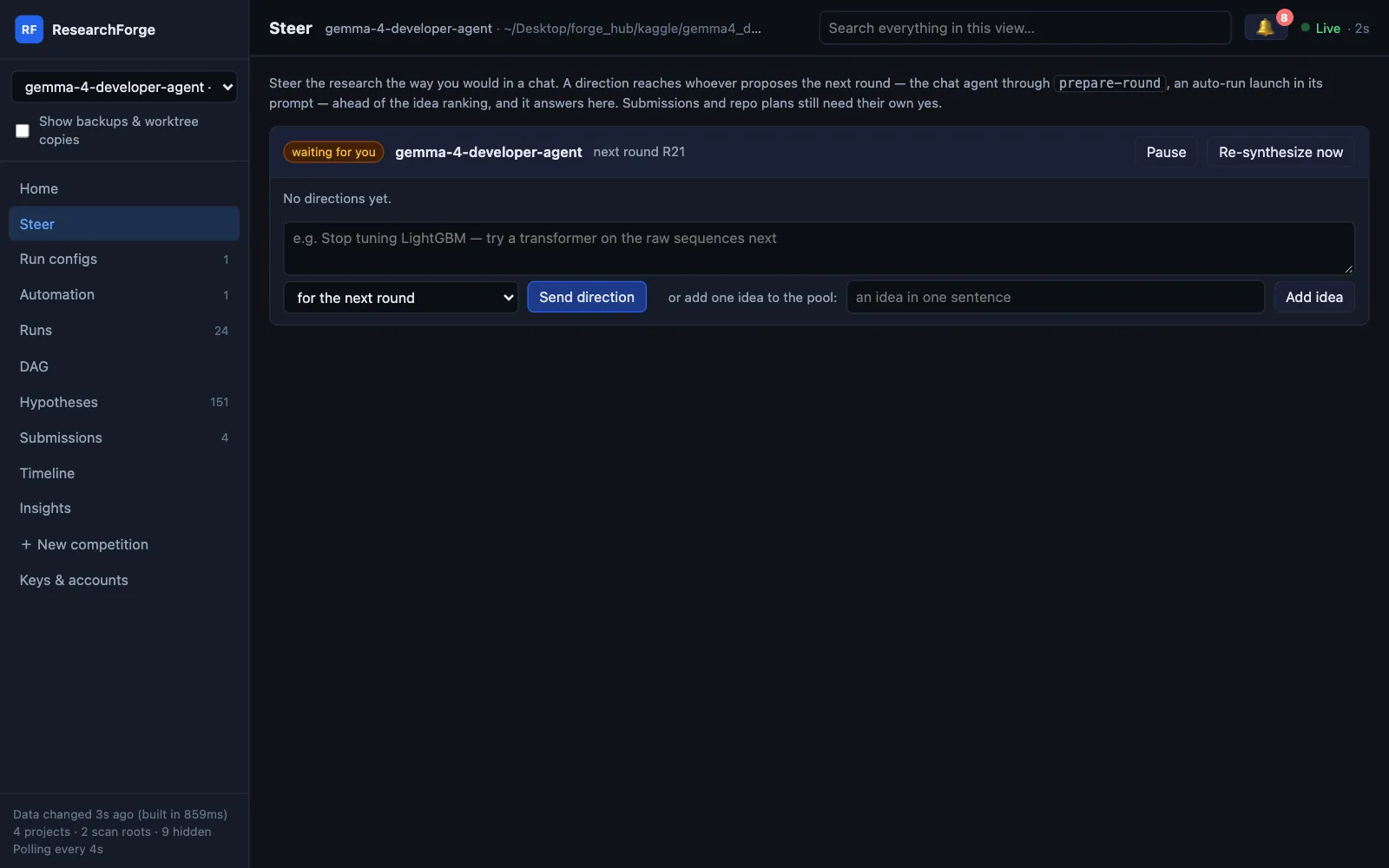
Everything you would say in a chat has a place on the dashboard. A direction reaches whoever proposes the next round, a question holds only the ideas it names, and a running round always finishes; your change applies from the next one.

localhost:7842
Steer: a direction for the next round or every round, plus Pause, Re-synthesize and Add idea
localhost:7842
The 🔔: questions grouped by competition, with submissions left today and ⚙ answers that apply a setting
localhost:7842
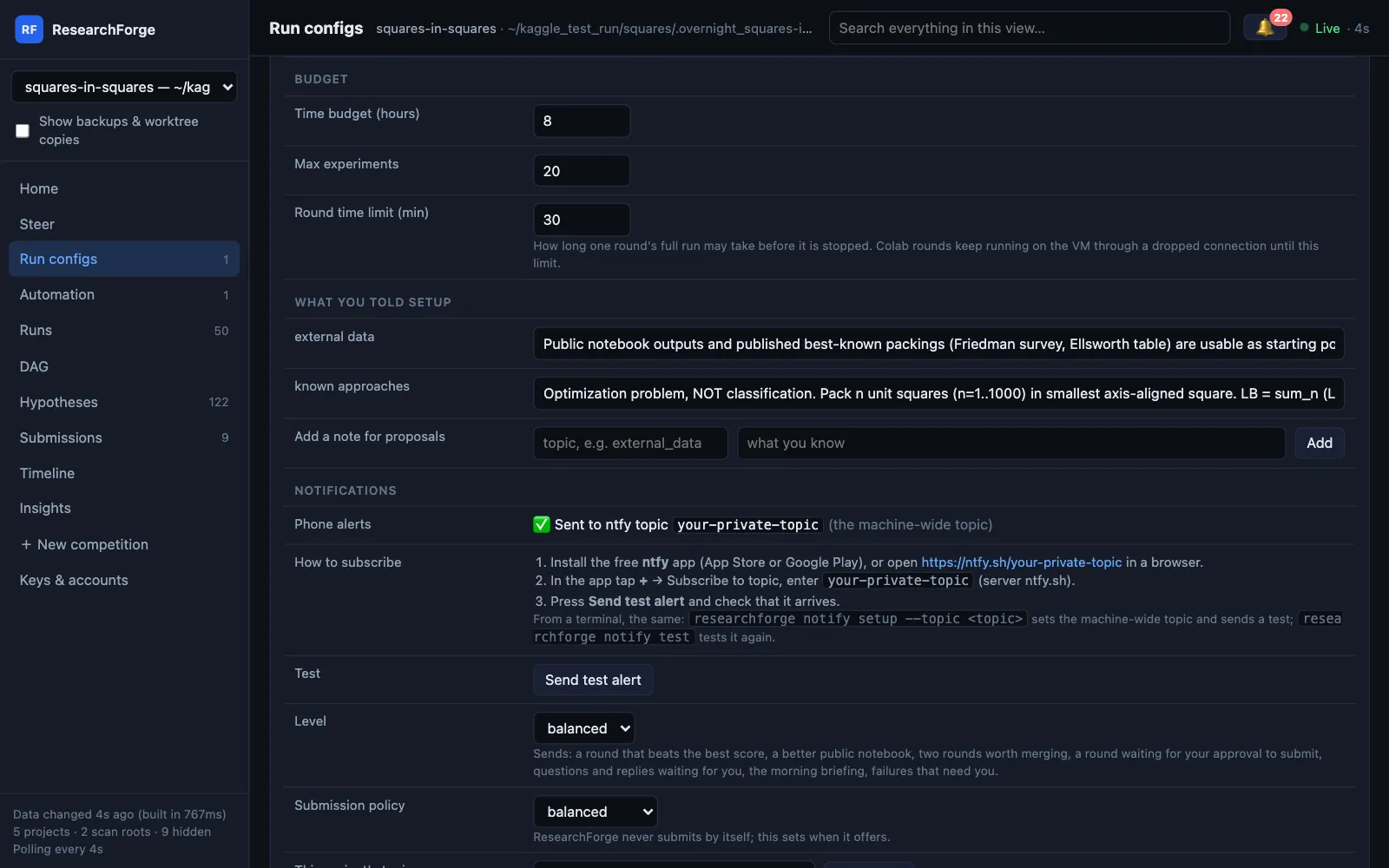
Run configs: budget, round time limit, what you told setup and phone alerts
  • Or from Claude Code, Cursor or a terminal:
  • /overnight status · pause · resume
  • /overnight add "idea" · respond · compute <target>
  • kaggle steer <slug> "try a transformer next" --standing
  • kaggle driver <slug> cursor · auto-run <slug> --stop
  • kaggle respond <slug> <id> --dismiss · archive <slug> R7
steering a live loop
$ researchforge kaggle status <slug>
State: ▶ active
Compute: kaggle_gpu
Ideas: 54 untested of 54
Settings: notify=balanced submit=balanced kaggle-gpu today=0
 
$ researchforge kaggle pause <slug> --reason "checking a leak"
⏸ Paused. prepare-round and execute-round will not start new rounds.
$ researchforge kaggle respond <slug> q-1a2b3c "no external data"
✅ q-1a2b3c answered: no external data

Submitting

One click, and only yours.

After a round you could submit, a submission question reaches your phone and the dashboard. The alert is plain text; you decide on the dashboard with Approve & submit or Don't submit, or in a terminal with kaggle respond <slug> <id> yes.

  • Daily limit checked first. With none left today, the approval is refused with the reset time (00:00 UTC) and the question stays open.
  • Never twice. A round already submitted is refused, and one competition sends one submission at a time.
  • Readable refusals. Kaggle's reason is shown, not a bare “400 Bad Request”.
  • Unscored rounds too. A public notebook for a hidden test set prints no local score; the round is kept, marked unscored, and offered — Kaggle's score is its only measure.
  • Never unattended. An auto-run launch can never submit or answer a submission question.

Submissions and approvals in the docs →

localhost:7842
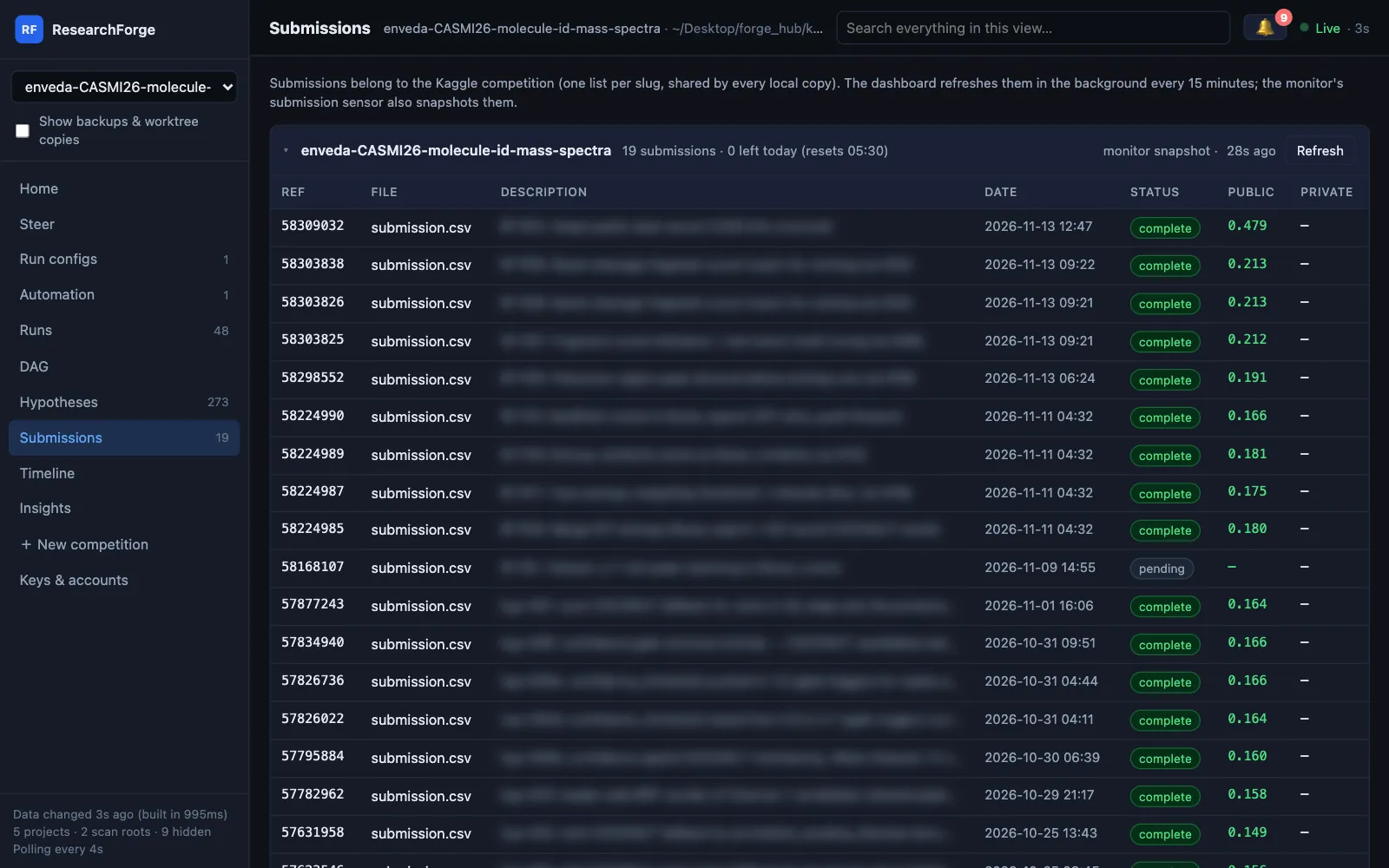
Submissions page with today's remaining Kaggle submissions
Submissions: every entry with its public score, and how many are left today
localhost:7842
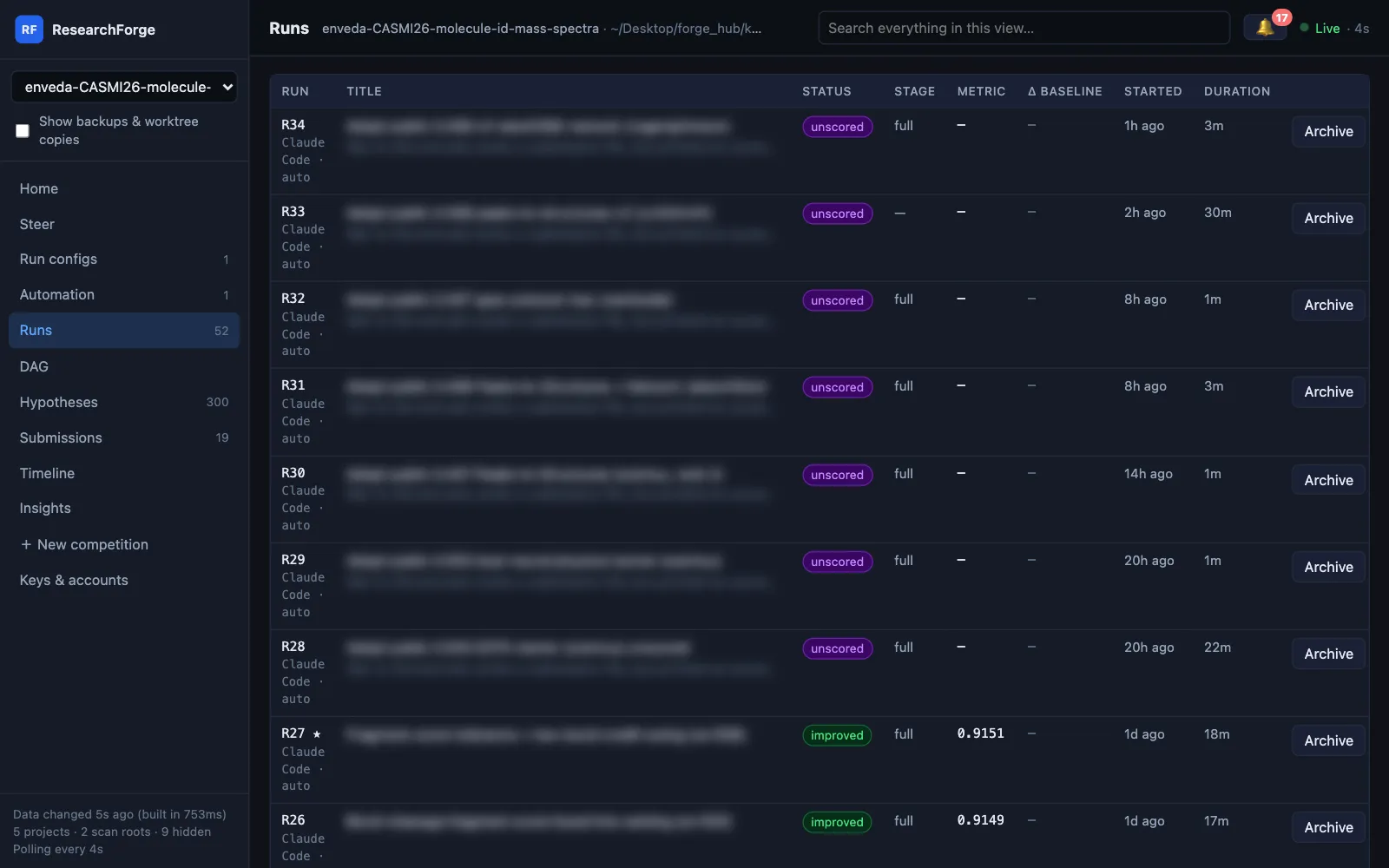
Unscored rounds marked purple on the Runs page
Unscored rounds in purple, kept and offered for submission (titles blurred: a live competition)

Safety, plainly

What it will and won't do with your account.

Credentials stay local

Your Kaggle token is checked with a read-only API call and is never logged, printed or embedded anywhere. Other tokens and keys are pasted on the local Keys & accounts page or typed in your own terminal — never in the chat — kept in ~/.config/researchforge/auto_run.env (mode 600) and never shown again.

Data stays where it belongs

With Kaggle, Colab, SSH or cloud compute, competition data never touches your laptop; the compute policy enforces it.

Notebook code only when you ask

Sensors turn public notebook titles and claimed scores into ideas, not code. Pulling a notebook to port from is a separate command, and each round records its source.

Never submits for you

Submission candidates wait for your Approve & submit, and auto-run cannot answer a submission question. An unattended run never asks you to run a command on your machine.

Notifications are public by design

ntfy topics are unauthenticated — pick an unguessable topic name, or use Telegram.

Honest limits

The machine running the loop must stay on, in every mode. Kaggle has no GPU-quota API, so treat the quota estimate as a guide and check Kaggle’s own page.

Drive it fromWho proposes experimentsKeyEditor stays openStart with
Claude CodeClaude, in your Claude Code sessionNone — your Claude planYes — or turn on auto-run/overnight <url>
CursorCursor’s agentNone — your Cursor planYes — or turn on auto-run@overnight <url>
BYOK (your API key)Claude, Gemini or OpenAI, called directly from the terminalANTHROPIC_API_KEY, GEMINI_API_KEY or OPENAI_API_KEYNo — runs headlessresearchforge kaggle run <slug>
Local modelYour Ollama model, called by ResearchForgeNone — RESEARCHFORGE_LLM=ollama/<model>No — runs headlessresearchforge kaggle run <slug>

In every mode the loop runs on the machine where you start it, so that machine stays on. Want your laptop free? Start it on an always-on server over SSH.

Questions about Kaggle Overnight

Is Kaggle Overnight an AI agent for Kaggle?+

Yes — an open-source one that works on live competitions with your own Kaggle account. Your coding agent (Claude Code or Cursor) or your own model proposes each round; Kaggle Overnight runs it on the compute you pick, measures it, keeps or rejects it with a reason, and offers you the better submissions. Unlike agents scored offline on MLE-bench, it never submits without your Approve & submit.

Does it keep my leaderboard score up to date with new public notebooks?+

Yes. Public notebooks are checked every hour, re-runs included, and ranked by the score their authors claim. Those claiming more than your best score are run first as rounds on your compute, and a better result is offered to you as a submission — one click on Approve & submit updates your leaderboard entry. Auto-run then keeps improving on top of them. It never submits on its own.

What is Kaggle Overnight?+

An open-source loop that keeps your Kaggle score current and then pushes it further while you sleep. It checks the competition’s public notebooks every hour and runs the best as rounds, then Claude Code, Cursor, an API model or a local Ollama model proposes improvements on top; ResearchForge routes it to the right compute, measures it against a frozen baseline, keeps or rejects it with a reason, and sends you a morning report.

Does it download competition data to my laptop?+

Only when the chosen compute is this machine and the data is allowed to be local. With Kaggle GPU, Colab, SSH or cloud compute the data stays on that machine, and the compute policy raises an error if anything tries to download it locally.

Do I need an API key?+

No. From Claude Code or Cursor, your editor’s AI proposes each experiment while the session is open. Turn on auto-run and headless Claude Code or the Cursor agent starts new rounds with no chat open, on the same plan. With an Anthropic, Gemini or OpenAI key, or a free local model through Ollama, it runs headless with no editor. In every mode the machine running the loop stays on — use an always-on server over SSH to free your laptop.

Will it submit to Kaggle without asking?+

Never. Submission candidates are offered according to your submission policy, and only you decide. ResearchForge records your decision; it does not press submit.

Can it keep experimenting with no chat open?+

Yes, with auto-run, which is off until you turn it on: researchforge kaggle auto-run <slug> --on. Each monitor cycle it starts rounds on untested ideas with headless Claude Code, the Cursor agent or your API key, within a daily limit and the Kaggle GPU cap. It waits while the loop is paused or a question is holding it, and it never submits.

Can I steer it while it runs?+

Yes: status, pause, resume, change compute, add your own idea, or answer a question the loop asked — from Claude Code (/overnight status, /overnight pause, …) or the CLI. A running round finishes; the change applies from the next one.

How do I install it?+

pip install researchforge. Then researchforge claude install --user and /overnight <url> in Claude Code, or researchforge cursor install --user and @overnight <url> in Cursor. Claude Code users can install the skills as a plugin instead: /plugin marketplace add forger-labs-hq/researchforge.

Can it run on a local model?+

Yes. Pull a model with Ollama, set RESEARCHFORGE_LLM=ollama/<model> (for example ollama/qwen3:14b), and run researchforge kaggle run <slug>. There is no API key, no token cost, and the prompts stay on your machine or your network.

How is it different from Karpathy’s autoresearch?+

autoresearch is a small loop in which an agent edits one training script and keeps the changes that improve validation loss on a single GPU. Kaggle Overnight applies the same keep-or-revert idea to a live Kaggle competition: it reads the competition and its public notebooks, runs each experiment on the compute you pick (this machine, Kaggle GPU, Colab, SSH or cloud), and records every rejected idea with its reason.

Is it like AIDE or the agents on MLE-bench?+

Those are research agents scored on offline copies of past Kaggle competitions. Kaggle Overnight works on live competitions, with your Kaggle account and your editor’s AI or your own model. It never submits without your approval, and it keeps a record you can check rather than a single final score.