Docs · Notifications
Phone alerts for experiments, with ntfy or Telegram
Set it up#
$ researchforge notify setup --topic <a-long-random-topic> --test # machine-wide, for every project$ researchforge notify status # where alerts go now$ researchforge notify test # send another test
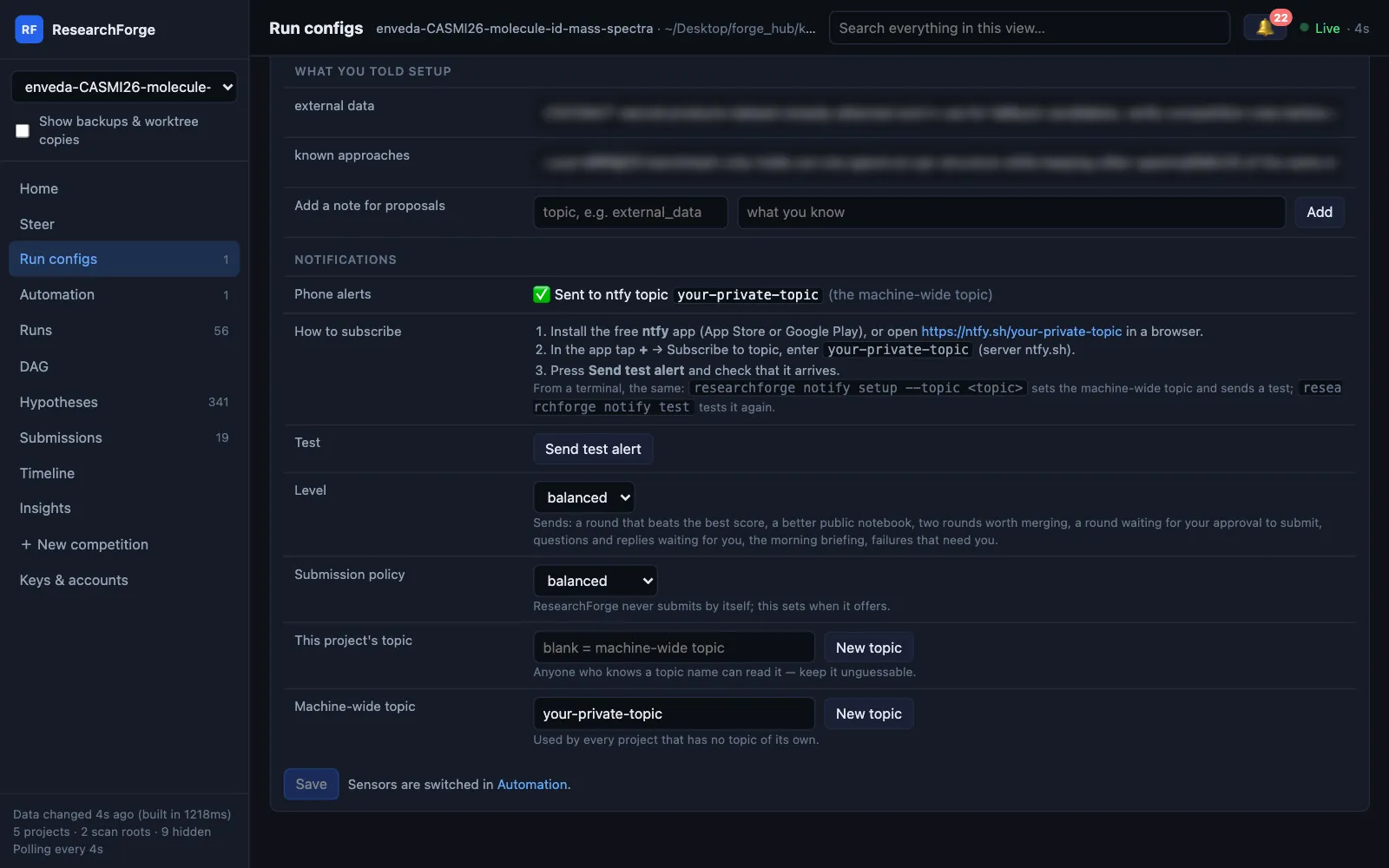
Then subscribe on your phone: install ntfy from the App Store or Google Play, tap + → Subscribe to topic and enter the same topic (or open https://ntfy.sh/<topic> in a browser). The dashboard does the same in Run configs → Notifications: where alerts go, how to subscribe, New topic and Send test alert, and the machine-wide topic is editable there too.
Which topic wins#
NTFY_TOPICin the environment, if set;- then the competition's own topic (
researchforge kaggle settings <slug> --ntfy-topic <topic>) — useful to send one competition to a teammate; - then the machine-wide topic from
notify setup.
There is no shared fallback topic: with none of these set, nothing is sent. Every alert, sent or not, is also logged to ~/.config/researchforge/notification_log.jsonl and shown on the dashboard's Timeline.
What each level sends#
$ researchforge kaggle settings <slug> --notify-level balanced # verbose | balanced | minimal
| Alert | verbose | balanced | minimal |
|---|---|---|---|
| A submission candidate is ready | ✓ | ✓ | ✓ |
| The loop needs your answer (questions, plans) | ✓ | ✓ | ✓ |
| Something is wrong (hung round, sensor error) | ✓ | ✓ | ✓ |
| A round beat the best so far | ✓ | ✓ | — |
| A public notebook beats your score | ✓ | ✓ | — |
| Two independent wins can be merged | ✓ | ✓ | — |
| The morning summary | ✓ | ✓ | — |
| Every result, including no change and failures | ✓ | — | — |
| New ideas reached the pool | ✓ | — | — |
balanced is the default. Set a level per competition here or in Run configs → Notifications.
Repository projects#
Repo auto-run sends to the project's own topic: a plan waiting for your approval (high priority), what each launch ran and the best result so far, a pause, a usage limit with its reset time, a launch stopped at its time limit, and the daily summary.
Alerts tell you; the dashboard decides#
An alert is plain text. When it says a decision is waiting — a submission or a plan — you make it on the dashboard under the 🔔 or in a terminal, so nothing is approved from a notification by accident. Under the 🔔 the questions are grouped by competition, each section showing its count and the Kaggle submissions left today. Some answers are marked ⚙: picking one also changes a Run configs setting, such as switching compute, after you confirm. See Answers that change a setting and Submissions and approvals.
Telegram instead#
$ export TELEGRAM_BOT_TOKEN=…$ export TELEGRAM_CHAT_ID=…